Try it — tap a dot, or search
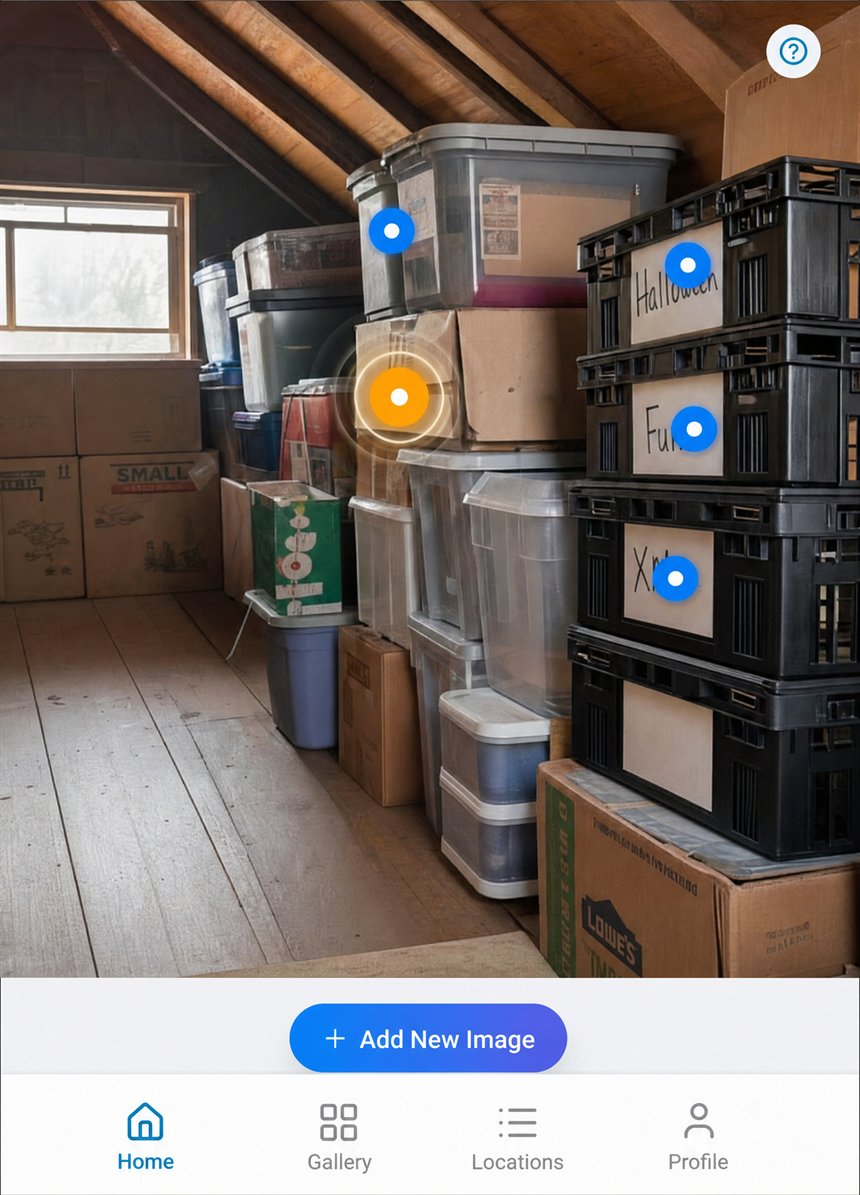
This interactive demo shows how Blue Dots work on a garage photograph. Each dot marks a storage location:
- Camping gear — Left rack, top shelf
- Sleeping bags — Left rack, top shelf
- Tent & poles — Left rack, top shelf
- Beach gear — Left rack, top shelf, back
- Winter jackets — Left rack, second shelf
- Ski gloves & hats — Left rack, second shelf
- Snow chains — Left rack, second shelf
- Ice skates — Left rack, second shelf, back
- Power drill — Left rack, third shelf
- Sander & bits — Left rack, third shelf
- Extension cords — Left rack, third shelf
- Work lights — Left rack, third shelf, back
- Paint cans — Left rack, bottom shelf
- Rollers & trays — Left rack, bottom shelf
- Drop cloths — Left rack, bottom shelf
- Masking tape — Left rack, bottom shelf, back
- Christmas lights — Corner rack, top stack
- Holiday ornaments — Corner rack, top stack
- Halloween decor — Corner rack, second shelf
- Easter decorations — Corner rack, second shelf
- Gift wrap & ribbon — Corner rack, third shelf
- Party supplies — Corner rack, third shelf
- Candles & lanterns — Corner rack, bottom shelf
- Picnic set — Corner rack, bottom shelf
- Spare bedding — Back wall, top stack
- Curtains & linens — Back wall, top stack
- Old textbooks — Back wall, top stack
- Vinyl records — Back wall, top stack
- Rope & twine — Back wall, rack top
- Bungee & straps — Back wall, rack top
- Car care kit — Back wall, rack top
- Cleaning supplies — Back wall, rack top
- Hand tools — Back wall, middle shelf
- Screws & fasteners — Back wall, middle shelf
- Antifreeze coolant — Back wall, middle shelf
- Motor oil — Back wall, middle shelf
- Battery charger — Back wall, fourth shelf
- Jumper cables — Back wall, fourth shelf
- Air compressor — Back wall, fourth shelf
- Tie-down straps — Back wall, fourth shelf
- Fishing tackle — Back wall, bottom shelf
- Hiking boots — Back wall, bottom shelf
- Sports balls — Back wall, bottom shelf
- Yoga & gym gear — Back wall, bottom shelf
- Garden hose — Right rack, top stack
- Sprinkler parts — Right rack, top stack
- Pool supplies — Right rack, second stack
- Patio cushions — Right rack, second stack
- Jerry cans — Right rack, third shelf
- Funnels & spouts — Right rack, third shelf
- Plumbing fittings — Right rack, fourth shelf
- Electrical spares — Right rack, fourth shelf
- Paint sprayer — Right rack, fifth shelf
- Sandpaper & files — Right rack, fifth shelf
- Bike helmets — Right rack, bottom shelf
- Pads & work gloves — Right rack, bottom shelf
Tap any Blue Dot to open a preview of the app's storage-box page for that spot. Use the search bar to find an item — the matching dot lights up yellow, showing the exact location instantly.
The visual organizer
Photograph one room.
Name what's in it.
That's the whole job.
After that, type what you're looking for and the matching Blue Dot turns yellow on your own photo. No lists to scroll, no barcodes, no labels to print.


Your space, mapped. One photo becomes a searchable inventory of everything you own.
How it works
Search lights up the exact spot
Snap a photo of any space, drop a few Blue Dots on your storage boxes, then search any item — the matching dot lights up yellow on your real photo.
Proof of ownership
Nobody makes the list until they need it
A break-in. A flood. A move that goes wrong, or a parent's house to settle. The moment you need a record of what you owned is always the moment after it would have been easy to make one.
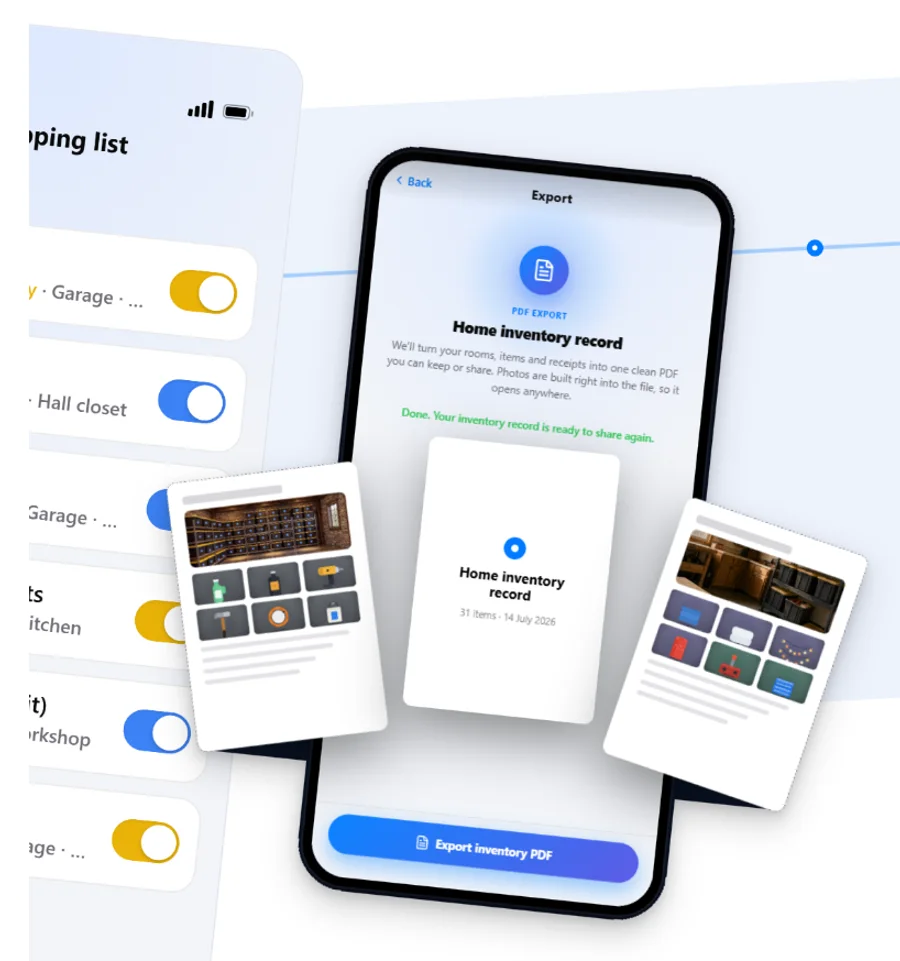
A space you have already catalogued exports as a PDF — your rooms, your items and your own photographs, in one file you can hand to whoever is asking.
Said plainly: it is a record that you owned these things and where you kept them. It is not a valuation, it carries no prices, and it does not settle a claim on its own. It is the document you wish you had made first.
PDF export is on the paid plans.
FAQ
Answers for every organizer
Everything the Blue Dots ritual asks of you, in plain words. Tap a question to expand.
Blue Dots is a visual decluttering and organization app. You take one photo of any space — a garage, closet, kitchen, storage unit, or moving box — drop dots on the exact spots where items are stored, and the app turns that photo into a permanent, searchable map of your belongings. When you search, the matching dot lights up yellow on your real photo showing you exactly where the item is.
Blue Dot markers are interactive dots you place directly on a photograph of any physical space. Each dot remembers what is stored at that location — including a description, extra photos, and a status like Available, Almost Out, or Need to Buy. When you search for an item, the matching dot lights up yellow on the original photo so you see the exact real-world spot instantly.
Take a photo of your storage space, then tap the screen to drop dots on shelves, drawers, boxes, or any surface used for storage. Tap a dot to add a name, description, and status for the items at that spot. Placing the dots is quick. Naming what is inside them is the part that takes real time, because you are handling your own belongings while you do it.
That depends on how much is in the space, and it is worth being straight about it. The photo and the dots take a few minutes. Naming the contents takes as long as it takes to go through them. Blue Dots is not a daily habit to keep up — it is a project you finish one space at a time, one shelf or cupboard or room per sitting, and every space you finish stays findable from then on.
Yes. The app gives you a full inventory count across all your storage spaces. You can browse by category, name, or location, and see at a glance exactly how many items you have tracked.
Your photos and item names are encrypted in transit and at rest. Your spaces are private to your account — nobody else can see them unless you deliberately share one, and a share you create can be revoked. The one exception is things you mark to let go: once a thing in Personal mode has a photo and is marked Want to Sell, Donate or Gift, or Get Rid Of, the app shows it to your friends, and to nobody else. You can stop showing it at any time.
Yes. You can easily reassign an item to a different storage location at any time. Just tap the item, select "Move," and choose the new location. Your inventory updates instantly.
Blue Dots is available on Android (Google Play) and iOS (Apple App Store). Your data syncs automatically across all your devices, so you can view your inventory from your phone, tablet, or any connected device — from anywhere in the world.
Two people in particular. The collector or hobbyist whose things are worth keeping track of — records, tools, models, parts, spares. And anyone facing a big sort-out: a move, a downsizing, a parent's house, an insurance record you never got round to making. If your belongings outgrew your memory, this was built for you.